QRtistry (qrtistry.com) Chrome extension — QRtistry Companion — generates free styled static QR codes from any tab, right-click export for links and images, and dynamic code scan analytics when signed in. Install from the Chrome Web Store; static export requires no account.
Browser companion
QR codes from any tab
The QRtistry Chrome extension brings the generator to your toolbar — right-click links, export styled PNGs, and check scan counts without leaving the page you are on.
Static QR codes stay free — PNG, SVG, and clipboard export with no account.
Right-click any link, page, or image for instant styled export from the context menu.
Signed-in users see scan totals, sparklines, and a toolbar badge for unseen scans.
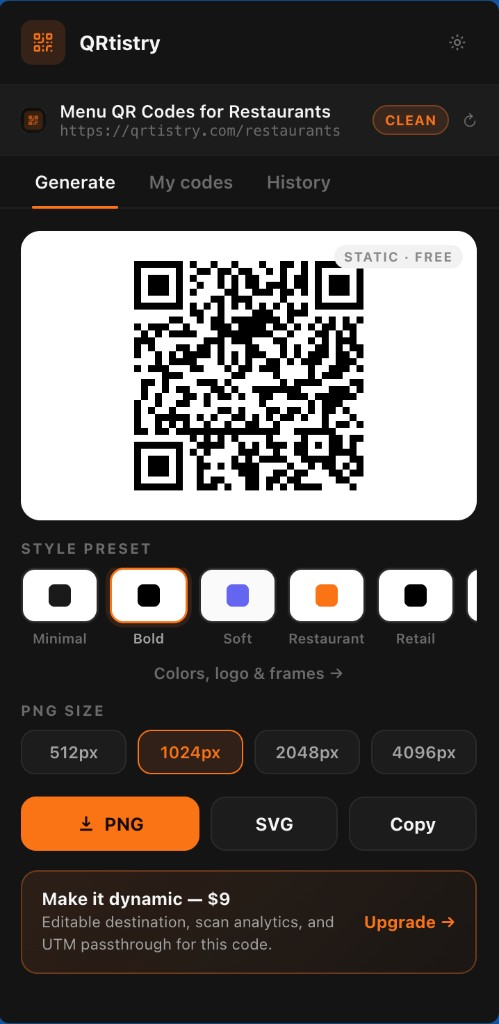
QRtistry Companion
Generate · My codes · History — in your toolbar
Built for everyday workflows
Same presets and export quality as the web generator — optimized for speed when you are already on the destination page.
Generate from any tab
Open the popup on the page you are viewing — the URL is pre-filled, tracking params stripped, and your preset remembered.
Right-click any link
"QR code for this link / page / image" in the context menu opens the generator with that URL ready to export.
Static codes stay free
Styled PNG, SVG, and clipboard export work signed out — same zero-server promise as the web generator. No account required.
Track dynamic codes
Signed-in users see scan totals, sparklines, and quick links to the full dashboard. Toolbar badge shows unseen scans.
How it works
- 1
Install the extension
Add QRtistry Companion from the Chrome Web Store — one click, no separate account.
- 2
Open any page
Click the toolbar icon or right-click a link. Pick a preset, choose PNG size, download or copy.
- 3
Upgrade when you need analytics
Make a code dynamic on QRtistry for editable destinations, scan analytics, and UTM passthrough — same pricing as the site.
0¢
Static export — no watermark, no expiry
50
Recent codes saved locally in your browser
1-click
From toolbar or right-click to download
Privacy
- Static QR generation runs entirely in your browser — the tab URL is never sent to our servers for export.
- Generation history (last 50 codes) stays in chrome.storage.local on your device only.
- My codes and the scan badge use your existing qrtistry.com session — the same API as the dashboard.
Chrome extension FAQ
Install, privacy, pricing, and dynamic analytics — straight answers for the gateway page.
Is the QRtistry Chrome extension free?
Yes. Static QR code generation — styled PNG, SVG, and clipboard export — is free with no account. Dynamic codes with scan analytics use the same $29 one-time or Agency pricing as the website (Agency includes a 3-day free trial for new workspaces).
Do I need a QRtistry account to use the extension?
No account is required for static codes. Sign in with your existing qrtistry.com session when you want My codes, scan totals, and the toolbar badge for dynamic codes.
Does the extension send my browsing history to QRtistry?
No. Static export runs locally in your browser. Only signed-in My codes and badge polling call the same qrtistry.com API as the dashboard — no broad browsing data is collected.
Can I generate QR codes from links without opening a new tab?
Yes. Right-click any link, the current page, or an image and choose QR code from the context menu. The popup opens with the URL ready and your last preset applied.
Will my static QR codes stop working if I uninstall the extension?
No. Static codes encode the destination directly in the image. They keep working forever whether or not the extension is installed.
How do I track scans from codes made in the extension?
Create or convert a code to dynamic on qrtistry.com. Once signed in, the extension My codes tab shows scan totals and links to the full analytics dashboard.
Ready to generate from any tab?
Install the extension for toolbar and right-click export, or open the full editor for logos, frames, and every style control.